


You’re about to make a hiring mistake.
Your support queue has tripled in six months. Response times are slipping. Your best agent just asked for a raise (deserved) or they’re leaving (also deserved). The obvious solution is to hire more people. But that’s exactly the wrong way to scale customer support.
Here’s what nobody tells you: most support teams scale linearly when they should scale logarithmically. If doubling your customer base means doubling your support team, you’re building a cost center that will eventually consume your margins.
The companies that scale support successfully don’t just add headcount. They systematically eliminate the reasons customers need to contact support in the first place. They automate the repetitive work. They build systems that get more efficient as they grow, not less.
This guide covers the strategies that actually work for scaling customer support, from quick wins you can implement today to structural changes that compound over time.
Knowing how to scale customer support means shifting from adding headcount to building systems: self-service documentation that deflects common questions, automation that handles repetitive work, and tiered service that matches resources to customer value. Done right, support costs grow slower than your customer base, not in lockstep with it.
The Math of Scaling Support
Before diving into tactics, let’s understand the economics.
The average cost per support ticket ranges from $2.93 for self-service to $13.50 for live channels according to industry benchmarks. For SaaS companies specifically, that number climbs to $25-35 per ticket when you factor in agent salaries, tools, and management overhead.
Now do the math for your situation:
- 1,000 tickets/month × $25/ticket = $25,000/month in support costs
- Growing to 5,000 tickets/month = $125,000/month with linear scaling
That’s an additional $1.2 million per year. Or you could invest a fraction of that in systems that prevent those tickets from being created.
Research from TSIA shows that 40-60% of support tickets could be resolved through documentation alone. Gartner found that companies implementing virtual assistants report up to 70% reduction in call, chat, and email inquiries.
The goal isn’t to eliminate human support. It’s to ensure humans spend their time on problems that actually require human judgment.
Strategy 1: Scale Through Self-Service Documentation
Most knowledge bases fail because they’re treated as a one-time project. Someone writes initial documentation, leadership declares victory, and then the content slowly rots while your product evolves.
The result? Customers search your help center, find outdated information, and email support anyway. You’ve added a step to their journey without reducing your ticket volume.
What separates effective knowledge bases
Coverage of real questions. Don’t document what you think customers should know. Document what they actually ask. Export your last 90 days of tickets, categorize by topic, and write articles for the top 20 issues. This alone can deflect 30-40% of incoming volume.
Accuracy that keeps pace with your product. This is where most companies fail. Features change weekly. Documentation updated quarterly (if you’re lucky) creates a trust gap. Once customers learn your docs are unreliable, they skip them entirely.
Findability. Your knowledge base is useless if customers can’t find it. This means:
- SEO optimization so Google surfaces your articles
- In-app help widgets that show relevant content contextually
- Search that understands intent, not just keywords
The maintenance problem
Here’s the uncomfortable truth: manual documentation maintenance doesn’t scale.
After every product release, someone needs to:
- Identify which articles reference changed features
- Update text, screenshots, and examples
- Verify the changes are accurate
- Republish affected content
For a team shipping weekly with 100+ help articles, this becomes a full-time job. Most companies don’t have that bandwidth, so documentation drifts until a customer complaint forces an update. (If you’re tackling this manually, a structured knowledge base maintenance checklist can help you stay systematic.)
This is where automated knowledge bases change the equation.
 Tools like Ferndesk automate this layer entirely. Its AI agent monitors your codebase and support inbox, flags outdated articles, drafts updates for approval, and recaptures screenshots automatically when your UI changes. The details are covered in the Ferndesk section below, but the principle applies regardless of tool: documentation maintenance needs to be a continuous, system-driven process, not a quarterly project.
For teams serious about scaling through self-service, this kind of automation is the difference between documentation that compounds in value and documentation that becomes a liability.
Strategy 2: Scale Customer Service with Proactive Deflection
Support deflection isn’t about making it hard to reach humans. It’s about making it easy for customers to solve problems without waiting.
Harvard Business Review research found that 81% of customers attempt to find answers themselves before contacting support. They want to self-serve. Your job is to let them.
Implement contextual in-app help
The best time to help a customer is the moment they’re confused, not after they’ve rage-quit your product and opened a support ticket.
In-app help widgets surface relevant documentation based on where users are in your product. If someone is on your billing settings page, they see articles about billing. If they’re configuring an integration, they see integration guides. No searching required.
According to Toku research, 62% of customers prefer to resolve issues in-app. An embedded widget keeps them in your product instead of bouncing them to a separate help center (where they might get distracted or give up).
Ferndesk’s embeddable widget takes this further with an AI assistant that can answer questions conversationally. Customers describe their problem in natural language, and the assistant provides relevant answers drawn from your knowledge base. If the AI can’t resolve the issue, it hands off to human support with full context of what was already tried.
Build proactive support triggers
Don’t wait for customers to ask for help. Anticipate where they’ll struggle.
Product analytics integration: When customers spend too long on a specific screen or repeatedly fail an action, trigger a help modal or chatbot prompt. “Need help connecting your Slack workspace?” appears after someone’s third failed attempt.
Onboarding checkpoints: New users abandon products at predictable points. Identify your drop-off moments and add contextual guidance. A tooltip at the right moment prevents a support ticket later.
Email sequences for common friction points: If 30% of users email support about the same issue during their first week, send a proactive email on day 3 addressing it. “Here’s a quick guide to setting up your first workflow” preempts the question.
Measure deflection, not just resolution
Most support teams track tickets resolved. Better teams track tickets prevented.
Deflection rate measures the percentage of support inquiries resolved through self-service:
Deflection Rate = (Self-Service Resolutions ÷ Total Potential Tickets) × 100
Track when customers:
- Search your knowledge base and don’t submit a ticket afterward
- Start the ticket submission flow but abandon after viewing suggested articles
- Interact with your chatbot and get their question answered
Well-designed self-service achieves 40-60% deflection rates. Top performers hit 70-80%. If you’re below 30%, your self-service isn’t working.
Strategy 3: Automate the Repetitive Work
Your support agents are spending time on tasks that don’t require human judgment. Every minute spent on rote work is a minute not spent on complex problems that actually need expertise.
Optimize Intake Before Triage
Most teams treat ticket intake as an afterthought. It isn’t. A poorly designed contact form creates triage work before a single agent touches the queue.
A well-structured intake form should capture:
- Issue type: A dropdown that routes tickets before a human sees them
- Urgency: Let customers self-select, then validate against account tier
- Account ID or email: Pre-populate customer context so agents don’t spend the first reply asking for it
- Article suggestions: Surface relevant help articles as the customer types their subject line. Many will self-serve and never submit.
Use progressive disclosure for complexity. A simple “I can’t log in” should reach an agent in two clicks. A complex integration issue should prompt additional fields that give the agent everything they need upfront. Better intake means faster first response and less back-and-forth.
Ticket routing and prioritization
Manual ticket assignment doesn’t scale. By the time a manager reviews the queue and assigns tickets appropriately, response times have already slipped.
AI-powered routing analyzes incoming tickets and assigns them based on:
- Topic classification (billing issues to billing specialists)
- Customer tier (enterprise clients to senior agents)
- Complexity prediction (simple questions to new agents for training)
- Language detection (route to native speakers)
The result: tickets reach the right person immediately instead of bouncing between queues.
Templated responses with personalization
Most support teams have canned responses. Few use them effectively.
Bad canned responses feel robotic. “Thank you for contacting support. We have received your inquiry and will respond within 24 hours.”
Good templated responses solve problems while feeling personal. They include:
- Dynamic fields that pull customer context (name, plan, recent actions)
- Specific answers to the question asked
- Links to relevant documentation
- Clear next steps
The goal isn’t to eliminate human touch. It’s to eliminate human typing of information that could be automated, so agents spend their words on what matters.
AI-assisted drafting
Modern AI can draft response suggestions that agents review and send. This shifts the work from “write from scratch” to “verify and edit.”
The efficiency gain is significant. Agents who previously handled 8 tickets per hour can handle 12-15 with AI assistance, without sacrificing quality. That’s a 50-80% productivity increase from the same headcount.
Tools like Intercom with Fin, Zendesk with AI agents, and Help Scout with AI Drafts all offer this capability. The quality varies, and it depends heavily on the knowledge base backing the AI, but the direction is clear.
Strategy 4: Tier Your Support Strategically
Not all customers deserve the same support experience. That sounds harsh, but it’s mathematically necessary for scaling.
Forecast Demand Before You Hire
Hiring without forecasting is guessing. Before you add headcount, understand your actual demand pattern.
Start with this formula:
Agents needed = (Monthly ticket volume × Average handle time in hours) ÷ (Working hours per agent × Target occupancy rate)
A team handling 2,000 tickets per month at 12 minutes average handle time, with agents working 160 hours per month at 80% occupancy, needs roughly 3.1 agents. Round up, account for PTO and training, and you have a defensible hiring number instead of a gut feeling.
Beyond headcount, map your volume by hour and day. Most SaaS support teams see 60-70% of weekly tickets arrive Monday through Wednesday, with a morning spike in each timezone. Staff for peaks, not averages. Understaffing Tuesday morning creates backlogs that bleed into Thursday.
Set backlog thresholds before you need them. If your queue exceeds X tickets before noon, trigger an overflow protocol: reassign agents from lower-priority work, activate async channels, or escalate to a BPO partner. Reacting to backlogs after they form is always more expensive than preventing them.
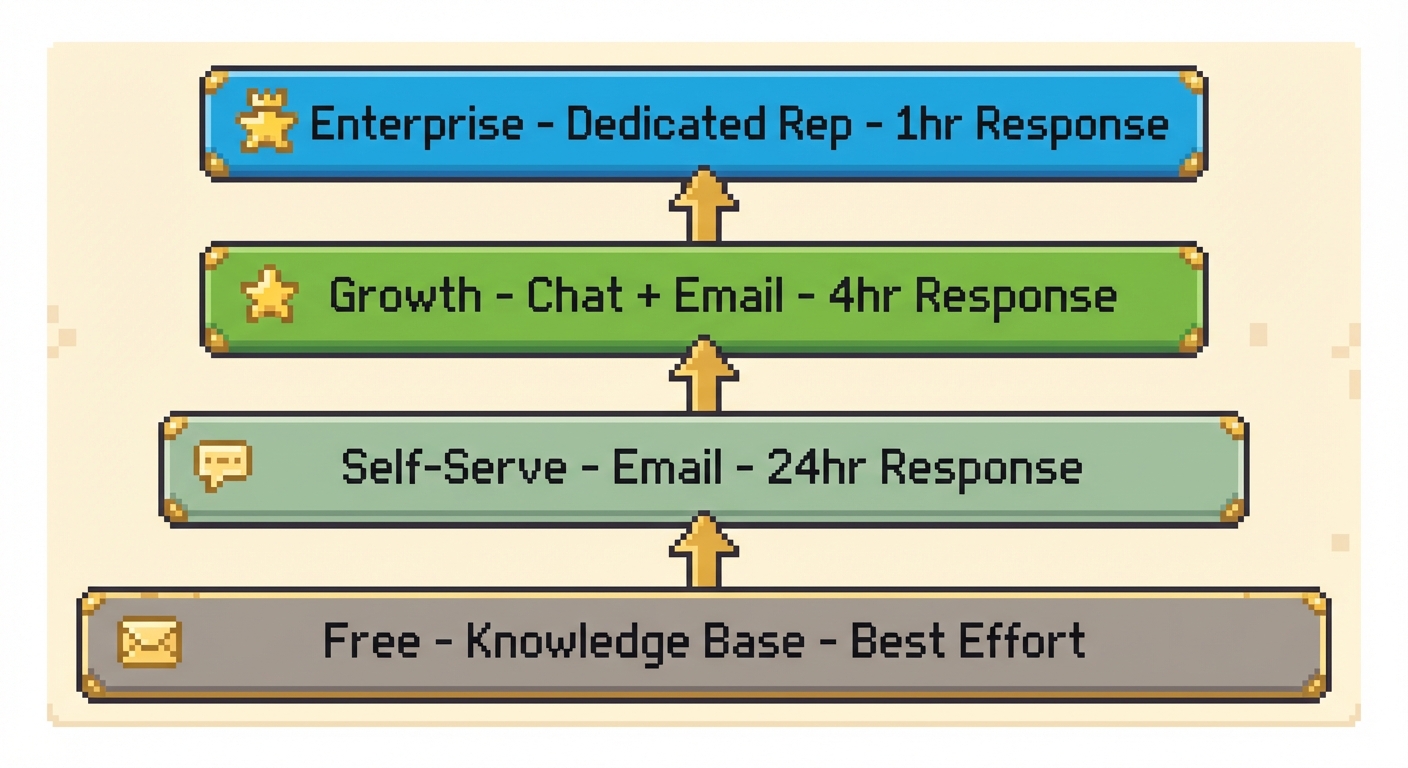
Define your support tiers
| Tier | Customer Profile | Response Target | Channel Access |
|---|---|---|---|
| Enterprise | $50k+ ARR, named accounts | 1 hour | Dedicated rep, phone, Slack |
| Growth | $5k-50k ARR | 4 hours | Priority queue, chat, email |
| Self-Serve | $0-5k ARR | 24 hours | Email, knowledge base |
| Free/Trial | Non-paying users | Best effort | Knowledge base, community |
This isn’t about providing bad support to smaller customers. It’s about providing appropriate support. Self-serve customers get comprehensive documentation and efficient email support. Enterprise customers get white-glove service because their contract justifies the cost.
Implement support as a feature
For B2B SaaS, support quality is often a buying criterion. Consider making enhanced support a paid upgrade:
- Standard: Email support, knowledge base access
- Premium (+$X/month): Chat support, faster response times
- Enterprise: Dedicated success manager, phone support, SLAs
This creates revenue from support rather than treating it purely as a cost center. It also self-selects: customers who value fast support will pay for it, reducing expectations among those who don’t.
Protect your enterprise experience
Your highest-value customers should never wait in the same queue as everyone else. Implement:
- Separate support channels (dedicated Slack, direct email to named rep)
- SLA monitoring with alerts before breaches
- Proactive check-ins, not just reactive support
- Escalation paths that bypass normal triage
The cost of losing an enterprise account typically exceeds a year of dedicated support resources. Staff accordingly.
Strategy 5: Outsource for Elastic Capacity
Hiring is slow. Demand isn’t. When ticket volume spikes faster than you can recruit and train, outsourcing gives you capacity without the long-term commitment.
When outsourcing makes sense
Outsourcing works best for predictable, high-volume, lower-complexity work. It works poorly for technical escalations, enterprise relationships, and anything requiring deep product knowledge.
| Model | Best For | Watch Out For |
|---|---|---|
| In-house only | Complex products, high-touch accounts | Slow to scale, high fixed cost |
| Outsourced (BPO) | High volume, repetitive tier-1 tickets | Quality drift, knowledge gaps |
| Hybrid | Mixed complexity, seasonal spikes | Requires strong handoff documentation |
Overflow and after-hours coverage checklist
Before routing tickets to an external team, confirm:
- Your knowledge base is current enough for an outsourced agent to use accurately
- Escalation paths are documented and tested
- Sensitive account types (enterprise, at-risk) are flagged and excluded from BPO routing
- SLAs are defined separately for outsourced versus in-house queues
- Language coverage matches your actual customer distribution, not just English
Outsourcing works best as a buffer, not a foundation. Use it to absorb nights, weekends, and seasonal spikes while your internal team handles the work that requires product expertise and relationship context.
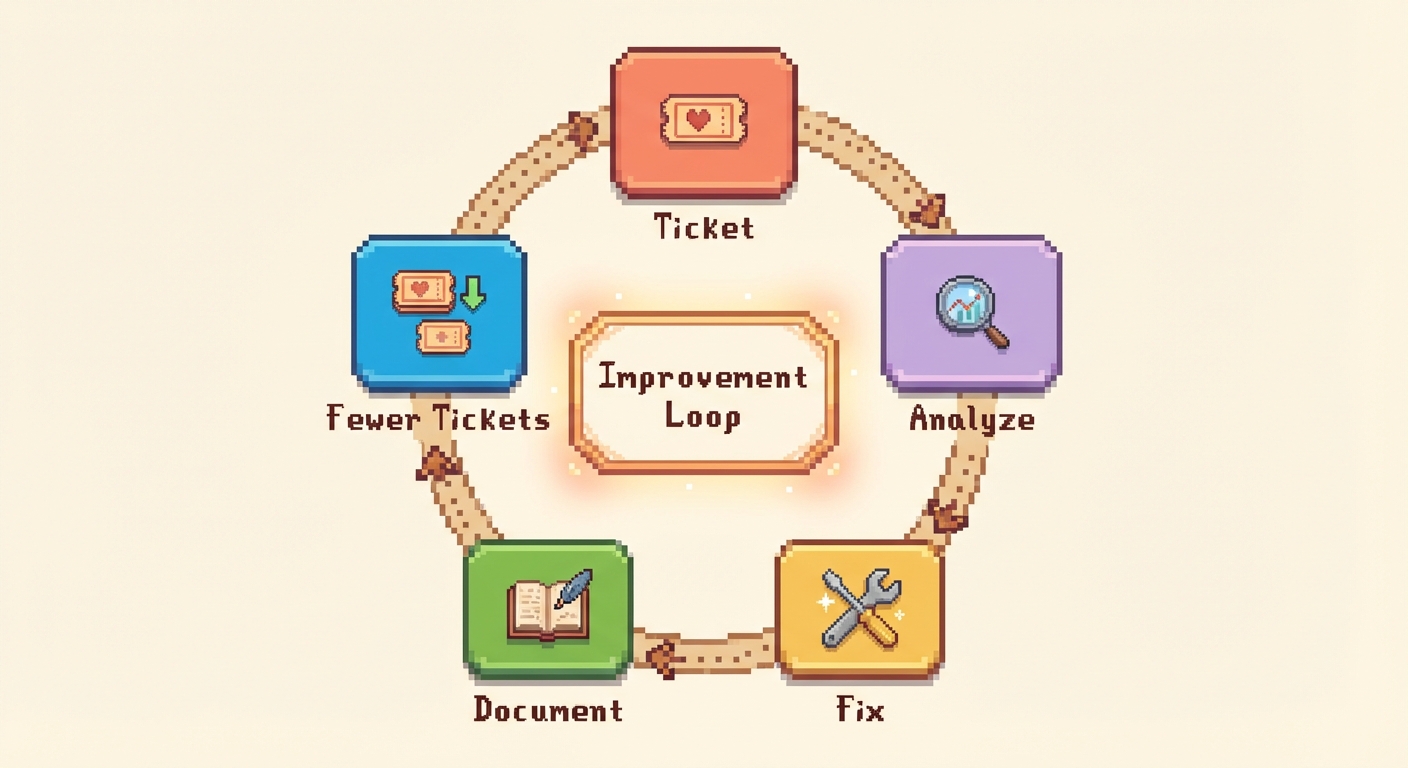
Strategy 6: Turn Support Into a Product Feedback Loop
Support isn’t just a cost center. It’s the most direct channel to understanding what’s broken in your product.
Systematic issue tracking
Every support ticket represents a failure somewhere:
- Documentation failure: The answer exists but customers couldn’t find it
- UX failure: The product is confusing
- Product failure: Something is broken or missing
- Expectation failure: Marketing promised something the product doesn’t deliver
Track tickets by root cause, not just by topic. “How do I export data?” might be a documentation gap (we have export but it’s not documented), a UX issue (export exists but is hidden), or a feature request (we don’t have export).
Feed insights to product teams
The support team sees patterns that product managers miss. Formalize this feedback:
- Weekly summary: Top 5 issues by volume, any new emerging patterns
- Quarterly deep-dive: Root cause analysis, recommended product changes
- Real-time alerts: Critical issues that need immediate attention
Some companies have support representatives join product planning meetings. Others maintain a shared “voice of customer” document. The format matters less than the consistency.
Close the loop publicly
When you fix an issue that generated support tickets, tell customers. This:
- Reduces future tickets from customers who had the same problem
- Builds trust that feedback is heard
- Creates positive sentiment from frustrated users who see their issue resolved
“You asked, we delivered” changelogs outperform generic release notes every time.
Strategy 7: Scale Your Support Team Through Enablement
Scaling support isn’t just about handling more volume. It’s about making each agent more effective.
Build an internal knowledge base
Your external documentation serves customers. Your internal documentation serves agents.
Create resources for:
- Product expertise: Deep dives on complex features, edge cases, known issues
- Process guides: How to handle refunds, escalations, account changes
- Troubleshooting trees: Decision trees for common issue types
- Customer context: How to identify customer tier, check account status, view recent activity
The goal: any agent can handle any ticket without asking a colleague. New hires become productive faster. Senior agents aren’t interrupted by questions.
Implement quality assurance
Without QA, support quality degrades as volume increases. Agents take shortcuts. Bad habits spread.
Ticket reviews: Sample 5-10% of tickets per agent weekly. Score on accuracy, tone, efficiency, and resolution.
Calibration sessions: Review the same tickets as a team. Align on what “good” looks like.
Coaching: Use QA findings for individual development, not punishment.
The goal isn’t surveillance. It’s maintaining quality standards as you scale and identifying training needs early.
Reduce cognitive load
Support agents make hundreds of small decisions daily. Each decision depletes mental energy. Reduce unnecessary decisions:
- Clear escalation criteria: “Escalate if X, Y, or Z” removes judgment calls
- Default responses: When in doubt, use the template
- Authorized concessions: Agents can offer X without approval
- Time limits: Spend max 10 minutes before escalating
Agents who aren’t constantly deciding what to do handle more tickets with less burnout.
Strategy 8: Build Omnichannel Support Without Fragmentation
Adding more channels without a unified system doesn’t scale support. It fragments it. Customers who email on Monday and chat on Wednesday expect you to remember both conversations. Most teams don’t deliver that, and the experience suffers.
Choose channels based on issue type, not preference
| Channel | Best For | SLA Target |
|---|---|---|
| Complex issues, billing, account changes | 4-24 hours by tier | |
| Live chat | Quick how-to questions, onboarding friction | Under 2 minutes first response |
| Phone | Enterprise escalations, high-stakes incidents | Immediate for named accounts |
| Community forum | Edge cases, peer advice, feature requests | Best effort, moderated weekly |
| In-app widget | Contextual help, self-service deflection | Instant (AI-assisted) |
Maintain context across channels
The fastest way to frustrate a customer is to make them repeat themselves. When a customer moves from chat to email to a phone call, every agent should see the full conversation history.
This requires a shared inbox or unified ticketing system where all channels feed into one view. Zendesk, Intercom, and Help Scout all support this. The configuration matters more than the tool: make sure channel-switching creates a linked thread, not a new ticket.
Set channel-specific SLAs and communicate them. “We respond to email within 4 hours on business days” sets an expectation. Customers who know what to expect are less likely to follow up repeatedly and inflate your queue.
Add community support for edge cases
A community forum handles the long tail of questions that don’t justify a formal help article. When a customer asks about an unusual integration or a niche workflow, another customer who solved the same problem is often the fastest path to an answer.
Starting a community doesn’t require a large user base. Seed it with your own team answering questions publicly. When a forum thread resolves a question that keeps recurring, convert it into a help article. This closes the loop between peer support and your official knowledge base.
Moderation rules matter early. Define what belongs in the forum versus a support ticket, and enforce it consistently. A well-moderated community reduces ticket volume. An unmoderated one creates noise that costs more than it saves.
Tools for Scaling Customer Support
Help desk platforms
| Platform | Best For | Starting Price | AI Features |
|---|---|---|---|
| Intercom | PLG companies | $29/seat | Fin chatbot |
| Zendesk | Enterprise scale | $55/agent | AI agents, bots |
| Help Scout | Human-first support | $50/user | AI drafts |
| Freshdesk | Budget-conscious | $15/agent | Freddy AI |
Knowledge base platforms
| Platform | Best For | Starting Price | AI Maintenance |
|---|---|---|---|
| Ferndesk | Fast-shipping teams | $149/month | Proactive |
| GitBook | Developer docs | $65/site | Beta |
| Document360 | Enterprise KB | Pricing available on request | Limited |
| KnowledgeOwl | Established teams | $99/month | None |
| HelpDocs | Simple products | $49/month | Credit-based |
For a deeper comparison, see our best help center software guide or the SaaS-specific breakdown.
Choosing your stack
If you’re scaling from 0: Start with an all-in-one platform like Intercom or Help Scout. You don’t need best-of-breed tools yet.
If you’re scaling from 500+ tickets/month: Invest in dedicated knowledge base software. The deflection gains justify the cost. Ferndesk offers AI-powered maintenance for $149/month or $1,490/year, significantly cheaper than hiring someone to keep docs updated.
If you’re scaling to enterprise: Separate your knowledge base from your help desk. Use Zendesk or Salesforce for ticketing, and a dedicated platform for documentation. The specialization matters at scale.
Define Quality Before You Scale
Speed without quality is just faster failure. Before you automate, tier, or outsource, define what a good support interaction looks like. Otherwise you scale the wrong behavior.
A simple QA scorecard gives every agent and reviewer a shared standard. Score each sampled ticket on four dimensions:
| Dimension | What to Evaluate | Weight |
|---|---|---|
| Accuracy | Was the answer correct and complete? | 40% |
| Empathy | Did the agent acknowledge the customer’s frustration? | 25% |
| Time to resolution | Was the issue resolved within SLA? | 20% |
| Policy adherence | Did the agent follow escalation and refund guidelines? | 15% |
Review 5-10% of tickets per agent weekly. Use findings in calibration sessions where the team scores the same ticket independently, then compares. Disagreement in calibration is useful: it surfaces where your standards are ambiguous before those ambiguities reach customers.
Set a minimum acceptable score before expanding capacity. If agents are averaging below 80%, adding volume makes the problem worse. Fix quality first, then scale.
The Ferndesk Approach to Scaling
Let me be direct about where Ferndesk fits in this picture.
Ferndesk is built for the specific problem that kills SaaS support scalability: documentation that can’t keep pace with product changes.
| Challenge | Traditional Approach | Ferndesk Approach |
|---|---|---|
| Documentation goes stale | Quarterly audits, manual updates | AI monitors codebase, flags outdated content weekly |
| Screenshots become outdated | Manual recapture after every UI change | Browser agent auto-captures and annotates screenshots |
| Knowledge gaps emerge | Wait for customer complaints | AI scans support tickets, drafts missing articles |
| Customers can’t find answers | Hope they use search | AI-powered widget surfaces relevant content in-app |
| New content creation is slow | Write from scratch, hope it’s accurate | AI drafts articles from support patterns and product data |
The widget deserves special mention. It’s not just a search box. Ferndesk’s AI assistant understands questions conversationally, draws answers from your entire knowledge base, and only escalates to human support when it can’t resolve the issue. Customers get instant help. Your ticket queue stays manageable.
For teams shipping weekly or faster, this kind of automation is the difference between support that scales logarithmically and support that scales linearly with customer growth.
Pricing: $149/month or $1,490/year for Pro (5 users, 1,000 AI conversations per month). No per-article limits. AI drafting is unlimited.
How to Scale Customer Support Globally
If your customers span multiple timezones, a single-region support team creates coverage gaps. Tickets submitted at 11 PM in Singapore shouldn’t wait until 9 AM in New York.
Follow-the-sun staffing
Follow-the-sun support divides coverage across regions so someone is always working during business hours somewhere. A common model uses three overlapping shifts: Americas, EMEA, and APAC. Each team handles the queue during their day and hands off open tickets with full context at shift end.
The handoff is where global support breaks down. Build a handoff protocol that includes:
- Open ticket summary with last action taken
- Any customer commitments made (callbacks, follow-ups)
- Escalations in progress and their current owner
- Known incidents or outages affecting the incoming region
Localized documentation and language routing
A global support model needs localized content. Routing a French-speaking customer to an English-only knowledge base defeats the purpose of regional coverage.
Ferndesk supports multilingual help centers with AI-assisted translation workflows, so your documentation scales into new languages without a separate localization team. When a customer’s browser language is detected, they see the relevant version automatically.
For language routing in your ticketing system, use intake form language detection or customer profile data to assign tickets to agents with matching language skills. Set regional SLAs that reflect actual staffing capacity in each timezone rather than applying a single global standard.
Implementation Roadmap
Here’s how to approach scaling your support systematically:
Phase 1: Quick Wins (Week 1-2)
- Audit your ticket volume. Export 90 days of data. What are the top 10 issues by frequency? How many could be solved with documentation?
- Create articles for your top 5 gaps. Don’t aim for perfect. Aim for “better than nothing.” A good article today deflects tickets starting tomorrow.
- Implement canned responses. For your top 10 ticket types, create templated responses that agents can personalize and send in under a minute.
Expected impact: 10-20% reduction in average handle time, foundation for future improvements.
Phase 2: Foundation (Week 3-6)
- Deploy an in-app help widget. Whether Ferndesk, Intercom, or another provider, get help inside your product where customers are already working.
- Set up ticket routing. Automate assignment based on topic, customer tier, and complexity. Stop manually triaging.
- Define support tiers. Decide what support level each customer segment receives. Communicate expectations clearly.
Expected impact: 20-30% ticket deflection, faster response times, clearer customer expectations.
Phase 3: Automation (Week 7-12)
- Implement AI-assisted responses. Enable AI drafting so agents review and edit rather than write from scratch.
- Automate documentation maintenance. Connect your knowledge base to your product development workflow. Ferndesk’s codebase monitoring handles this automatically.
- Build proactive support triggers. Identify friction points and add contextual help before customers need to ask.
Expected impact: 40-50% ticket deflection, 50%+ agent productivity increase, documentation that stays current.
Phase 4: Optimization (Ongoing)
- Measure and iterate. Track deflection rates, resolution times, and customer satisfaction. Identify what’s working and double down.
- Feed insights to product. Systematize the flow of support data to product teams. Fix root causes, not just symptoms.
- Expand coverage. As you resolve top issues, the next tier becomes visible. Keep building documentation for emerging patterns.
Expected impact: 60%+ deflection rates, support costs that scale sub-linearly with customer growth.
Common Scaling Mistakes to Avoid
Hiring before optimizing. New agents are expensive and take months to become productive. Invest in systems first. Hire when systems are maxed out.
Treating all tickets equally. Routing enterprise issues through the same queue as free tier questions destroys high-value relationships. Tier ruthlessly.
Ignoring documentation quality. A knowledge base with outdated content is worse than no knowledge base. Customers learn not to trust it. Invest in maintenance, whether manually or through automation like Ferndesk.
Over-automating too fast. Customers hate being trapped in chatbot loops. Start with AI assistance that hands off to humans gracefully. Increase automation as you prove reliability.
Forgetting the agent experience. Burned-out agents provide poor support. Reduce cognitive load, provide good tools, and maintain reasonable workloads.
What Happens When You Scale Customer Support Correctly
Here’s what happens when you scale support correctly:
Year 1: Ticket volume grows 100%, but support costs grow only 40%. Deflection systems absorb the difference.
Year 2: Self-service handles the majority of common issues. Agents focus on complex problems. Customer satisfaction increases because simple questions get instant answers and complex issues get expert attention.
Year 3: Support becomes a competitive advantage. Your help center ranks for industry keywords. Prospects evaluate your documentation before buying. Customers advocate for your product partly because the support experience is exceptional.
This doesn’t happen by accident. It happens by treating support as a system to be optimized, not just a cost to be managed.
Getting Started Today
You don’t need to implement everything at once. Start with what moves the needle most:
If tickets are overwhelming you: Create articles for your top 5 issues. Immediate deflection.
If documentation exists but customers don’t use it: Add an in-app widget. Reduce friction to finding help.
If documentation keeps going stale: Automate maintenance. Ferndesk handles this for $149/month or $1,490/year.
If agents are burned out: Implement AI-assisted drafting. Same quality, less effort.
If nothing above applies: You’re already doing better than most. Look at the optimization phase for your next moves.
Support that scales is support that systematically eliminates the need for itself. Every ticket you prevent is a customer who solved their problem faster and a support agent who can focus on something more valuable.
The tools exist. The strategies are proven. The only question is whether you’ll keep scaling linearly, or build systems that compound.
Frequently Asked Questions
How do I scale a customer support team without hiring?
Focus on three areas: self-service documentation that answers common questions, automation that handles repetitive tasks (routing, templated responses, AI drafting), and proactive support that prevents tickets before they’re created. Companies that invest in these systems can handle 2-3x more volume without proportional headcount increases.
What is omnichannel support and why does it matter for scaling?
Omnichannel support means handling email, chat, phone, in-app, and community channels through a unified system where conversation history follows the customer across every touchpoint. It matters for scaling because fragmented channels create duplicate tickets, repeated context-gathering, and inconsistent experiences. A shared inbox that unifies all channels lets a smaller team handle more volume without losing context.
What’s a good ticket deflection rate?
Well-designed self-service achieves 40-60% deflection rates. Top performers hit 70-80%. If you’re below 30%, your knowledge base likely has coverage gaps or findability problems. Measure deflection by tracking customers who search your help center and don’t submit tickets afterward.
How do you scale a help desk?
Scaling a help desk starts with reducing inbound volume before adding capacity. Build self-service documentation for your top ticket types, deploy an in-app widget to surface it contextually, and set up automated routing so tickets reach the right agent without manual triage. As volume grows, add AI-assisted drafting so agents edit rather than write from scratch. Layer in tiered SLAs so your highest-value accounts always get priority. Hire only when your systems are consistently at capacity, not before.
How do I keep documentation updated as my product changes?
Manual documentation maintenance doesn’t scale. Options include: dedicating headcount to doc updates (expensive), establishing update processes triggered by product releases (requires discipline), or using AI-powered tools like Ferndesk that monitor your codebase and flag outdated content automatically.
When should I hire more support agents vs invest in automation?
Hire when your systems are maxed out, not before. If agents are consistently hitting quality targets but still can’t keep up, that’s a hiring signal. If response times are slipping because of repetitive work or knowledge gaps, that’s a systems problem. Automation typically delivers 3-5x ROI compared to equivalent headcount.
How do I measure customer support scalability?
Track the ratio of tickets to customers over time. If tickets grow proportionally with customers, you’re scaling linearly (unsustainable). If tickets grow slower than customers, you’re scaling logarithmically (sustainable). Also measure cost per ticket, deflection rate, and agent utilization.
Ready to scale your support without scaling your headcount? Ferndesk automates knowledge base maintenance, captures screenshots automatically, and provides an AI-powered help widget that deflects tickets while delighting customers. Start free and see the difference AI-native documentation makes.


 Book a demo