

Your second teammate starts answering support@ on Monday morning. By Wednesday, a customer gets two different replies to the same email, or waits three days because nobody claimed it. On demo calls I run, founders and CTOs at 2 to 30 person software companies regularly describe support@ living in one person’s Gmail until a second person joins. I checked Google’s docs for how to create a shared inbox in Google Workspace across all three built-in methods. Google’s built-in options work for a while, then hit real support limits.
TL;DR
- Google’s shared inbox if your Admin console has the new feature and you only need shared reading and sending on a paid Workspace seat.
- A delegated support@ account if the new option is missing and two or three people want to share Gmail without sharing passwords.
- A Google Groups Collaborative Inbox if you want thread assignment for $0 extra and your team can work in Google Groups.
- Ferndesk Helpdesk if you want a shared inbox, live chat, a self-updating help center, and an AI agent at $149 a month flat with unlimited seats.
Three Google Workspace shared inbox options
| Option | Where you work | Extra seat | Assign threads | Internal notes | Best for |
|---|---|---|---|---|---|
| Google’s shared inbox | Gmail | Yes | No | No | Teams with the new Admin console feature |
| Delegated support@ account | Gmail | Yes | No | No | Two or three people inside Gmail |
| Google Groups Collaborative Inbox | Google Groups | No | Yes | No | Zero-budget teams needing basic assignment |
Each Google Workspace shared inbox option handles licensing and where you work differently. A shared mailbox in Google Workspace is a paid user account opened inside Gmail, while a Google Group is a free list that only adds assignment inside Google Groups.
Option A: Google’s shared inbox
Google’s newest option is a native Google shared inbox that lets admins set up support@ or info@ email for the company directly in the Admin console. It is listed for Business Starter, Business Standard, and Business Plus plans, though Google is releasing it in phases so it may not appear yet.
Follow Google’s shared inbox setup guide to create one:
- Open the Google Admin console and go to the Users section on the Home page.
- Click “Set up a shared email address” and enter [email protected].
- Add teammates as delegates.
- Click Next, review, and click Done.
An existing support@ user converts the same way by entering that address and choosing delegates. Delegates read, send, and delete mail, and view or add contacts. Replies show the shared address in From and the delegate in a “Sent by” line, which you can hide.
What it can’t do: this is still a regular Workspace account, so it takes a paid seat. Google’s setup page lists no conversation assignment, no internal notes, and no reports.
Option B: Delegate a Gmail account
If Option A is missing from your Admin console, you can still set up a Google Workspace shared inbox by delegating an account and converting it later. Mail delegation works on any plan with Mail delegation enabled, and it gives you a Google Workspace shared mailbox without password sharing.
Create a normal support@ user account, which takes a paid seat, and turn on Mail delegation in the Admin console under Apps, Google Workspace, Gmail, and User settings. Then follow Google’s Gmail delegation guide:
- Open Gmail in support@, click Settings, then See all settings.
- Open the Accounts tab and find “Grant access to your account”.
- Click “Add another account” and enter a teammate’s address.
- Click Next Step and send the grant email.
Invites expire in one week, and access can take up to 24 hours. You cannot delegate an alias because an alias is not a Google Account. Work accounts allow 1,000 delegates, with about 40 active at once.
For two people, this classic Gmail shared inbox setup is honestly enough for a while. What it can’t do: delegates lose Gemini in Gmail, Smart Compose, Smart Reply, spelling and grammar checks, and Chat in Gmail. On Android and iPhone, delegated accounts have no notification settings and no background sync. You also cannot assign emails to team members in Gmail, so people still risk double replies.
Option C: Google Groups Collaborative Inbox
A Google Groups Collaborative Inbox is the only Google Workspace collaborative inbox option that costs $0 in extra seats and lets you track emails in a shared inbox with statuses. I have not run one for Ferndesk’s own support, so these steps come from Google’s Collaborative Inbox guide.
Turn on Google Groups for Business first, then set it up:
- Create a Google Group with support@ and add your team as members.
- Let people outside your organization post so customers can email the group.
- Turn on conversation history, open Group settings, and pick Collaborative Inbox under “Enable additional Google Groups features”.
- Grant “Who can moderate metadata” so members can Take, Assign, and Mark as complete.
- Grant “Who can moderate content” to mark threads duplicate or “no action needed”.
Members can take threads, assign them with a note that emails the assignee, and filter by “Assigned to me”, “Assigned to anyone”, or “Not assigned”.
What it can’t do: all of this happens inside groups.google.com, not Gmail. To reply from support@ in Gmail, each person adds it under “Send mail as” in personal Gmail settings. That split workflow is the catch with any collaborative inbox solution for Gmail.
Limits of a Gmail shared inbox
Weighing Gmail delegation vs Collaborative Inbox setups solves password sharing, and for two founders answering ten emails a day that helps. Once volume climbs, every native option hits the same limits because Gmail was built for personal mail, not a SaaS customer support workflow.
Here is what is missing across all three:
- Delegated accounts and Google’s shared inbox have no internal notes on a thread, no assignment, and no reports.
- Collaborative Inbox adds assignment and statuses, but pulls your team out of Gmail into Google Groups.
- None of the options give you a true Gmail shared inbox for teams with live chat, shared saved replies, a help center, or an AI agent.
- Nothing connects a customer bug report to your issue tracker.
- Answers to repeated questions stay buried in one sent email instead of becoming searchable help docs.
Once you need private thread notes, clear ownership, or help docs fed by resolved tickets, Gmail slows your team down.
Signs you’ve outgrown Gmail
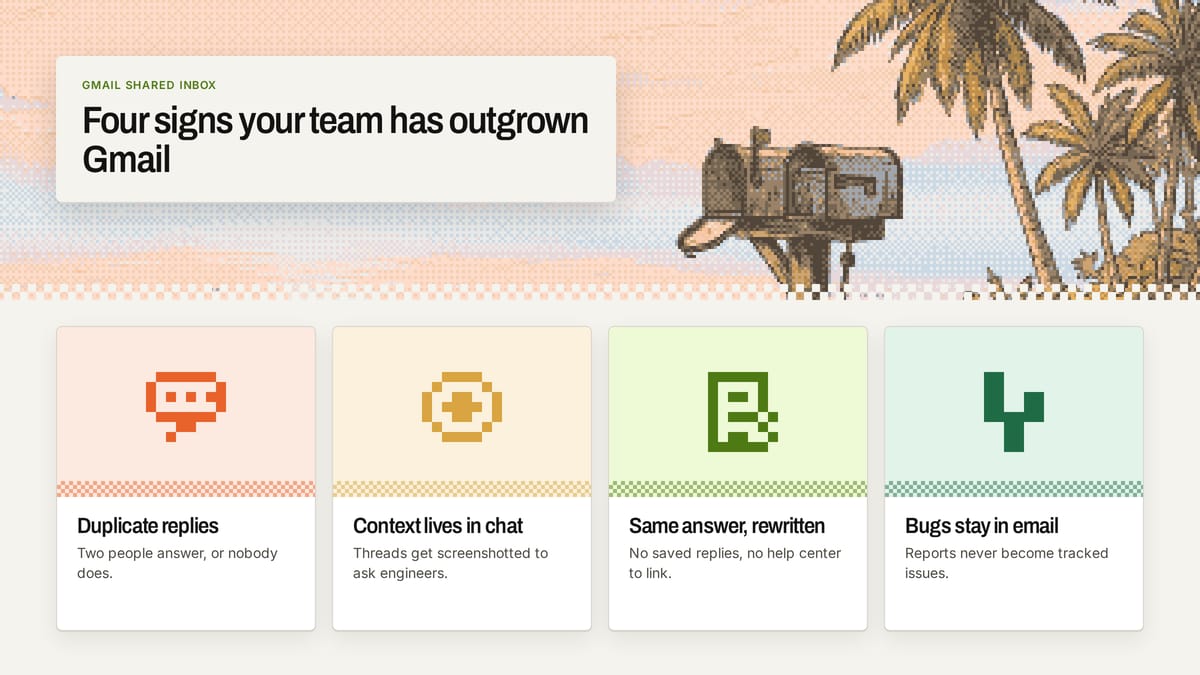
Teams usually move to a shared inbox for SaaS support teams when four problems repeat every week:
- Customers get duplicate replies or wait days in silence: nobody can see who owns a thread, so teams struggle to avoid duplicate replies.
- Teammates screenshot threads into chat to ask engineers for context, because Gmail lacks email assignment and internal notes.
- You rewrite the same answers from scratch with no shared saved replies or help center.
- Customer bug reports stay buried in an inbox instead of turning into tracked issues.
Changing shared inbox permissions and access control on a Google Workspace shared inbox will not fix those four. See our guide to customer support for startups for how early teams structure this shift.
Moving support@ to a help desk
Finding the best shared inbox for Google Workspace does not mean changing your email domain. With Ferndesk Helpdesk, your Google Workspace setup stays as it is: forward support@ into Ferndesk and answer email and live chat from the Ferndesk widget in one queue.
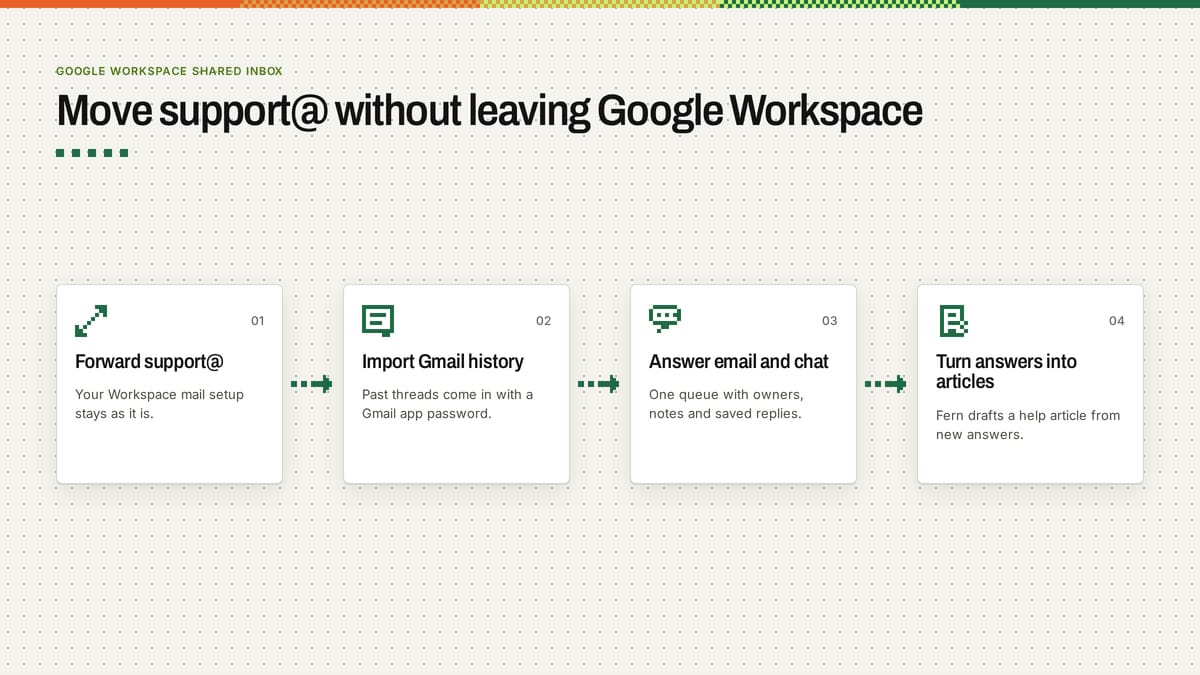
For 15 months we have built and run importers that pull conversations from Intercom, Zendesk, Help Scout, and Gmail, plus saved replies from the first three, with done-for-you migration included. You can import past Gmail threads with a Gmail app password without changing your setup. Inside the queue, you can assign owners, set priority, snooze threads, insert saved replies, move with J and K shortcuts, and see who else is viewing a ticket. You also get internal notes, saved views, tags, business hours, reply targets, satisfaction surveys, and Linear issue creation from any conversation.
Our Support Agent answers customers strictly from your help center articles and playbooks, and strips any link its search did not return. When it hands off, Fern reads past tickets, docs, and code through a read-only GitHub App to leave an internal note and a drafted reply, and never messages customers itself.
You also get a self-updating help center wired to the queue. Fern drafts new articles from answered threads and updates existing ones from your codebase and changelogs, and you review every draft before it publishes. When TrackFlo rolled out Ferndesk, Taylor Diem, their CTO, told us: “I have seen a 50% decrease in support tickets during the implementation.” At Client Portal, founder Laura Elizabeth told us: “My support requests have dropped significantly since I started using it.” And Jon Erickson, VP of Engineering at Leasecake, told us: “Before Ferndesk, our docs typically lagged a couple of weeks behind each update. Now they’re updated the same day we ship.”
Our Pro plan is $149 a month flat on our pricing page with unlimited seats and 1,000 conversations a month, whether the AI or a person answers. Another 500 conversations cost $25, with $0 per resolution, and teams under 5 people with less than $500K ARR pay $75 a month for the first 12 months with a 7-day free trial.
We run our own support on Ferndesk Helpdesk’s email and live chat inbox. If you want shared inbox tools that integrate with Gmail, check our Hiver alternatives and Front alternatives guides, our Help Scout comparison, or our best SaaS help desk software roundup.
How I checked this
I’m Wilson, founder of Ferndesk. Before Ferndesk, I co-founded Senja, a testimonial tool, and grew it to $850K ARR over 3.5 years. Now I run demo calls for Ferndesk myself, where founders regularly bring up a support@ Gmail inbox breaking once a second person joins. Because we built our Gmail importer ourselves, we have read a lot of real support@ Gmail threads on their way into Ferndesk Helpdesk.
I checked Google’s help pages for all three options on Nov 24, 2026. I have not used a Google Groups Collaborative Inbox for Ferndesk’s own support, so those steps come from Google’s docs. We build Ferndesk Helpdesk, so treat our recommendation with the grain of salt it deserves. No paid placements, no affiliate links, and corrections to [email protected] get dated on this page.
Frequently asked questions
Does Google Workspace have a shared inbox?
Yes, Google offers a built-in Google Workspace shared inbox option in the Admin console alongside delegated accounts and Google Groups. It works on Business Starter, Business Standard, and Business Plus plans, though Google rolls it out in phases. If it is missing, Google says to use a delegated account first.
Does a shared mailbox in Google Workspace need a license?
Google’s shared inbox and a delegated support@ account both satisfy Google Workspace shared mailbox license requirements by using one paid seat. Only a Google Groups Collaborative Inbox costs $0 in extra seats. Teammates join the group and reply via “Send mail as” in Gmail.
What is the difference between a Google Group and a shared mailbox?
A shared mailbox in Google Workspace is a paid user account opened in Gmail by delegates, while a Google Group is a free distribution list in Google Groups. Collaborative Inbox mode adds thread assignment and statuses inside Google Groups. A delegated mailbox stays inside Gmail without assignment or status tracking.
Can I share a Gmail inbox without sharing the password?
Yes, you can share a Gmail inbox with multiple users without sharing passwords by using Google’s new shared inbox or mail delegation. Both grant access to teammates’ own Workspace logins so nobody shares credentials. That keeps access control clean when people join or leave.
When should a small team move from Gmail to a help desk?
Move from a shared support inbox in Gmail to a help desk once teammates send duplicate replies, miss threads, or coordinate in side chats. Gmail falls short as soon as you need internal notes, clear ownership, shared saved replies, live chat, or a help center. Forwarding support@ adds those tools without changing Workspace.
Sources
Google help pages used for the setup steps:
- Create a shared inbox, Google Workspace Admin Help
- Delegate and collaborate on email, Gmail Help
- Make a group a Collaborative Inbox and Use a group as a Collaborative Inbox, Google Workspace Learning Center
- Ferndesk pricing


 Book a demo