

A customer follows a help article to a settings page that moved two releases ago. Or an employee gets a crisp AI answer quoting a policy HR retired last quarter. I’ve handled both kinds of tickets, and a confident wrong answer does more damage than no answer at all.
Below are nine real AI knowledge base examples. All nine are public docs or help centers you can open today. I walk through how a reader gets an answer and what your team can copy.
What makes these AI knowledge base examples worth studying?
An AI knowledge base is a centralized source of answers that uses natural-language understanding and semantic search to find relevant content, instead of matching exact keywords (Zendesk). The best ones go further than a search box.
I kept only examples I could point to by name, where the AI behavior is visible or publicly described. Each entry covers three things:
- The experience: What the reader actually sees.
- How the answer arrives: Where the reader asks and what comes back.
- The takeaway: One idea you can apply to your own docs.
1. Stripe Docs inline AI assistant
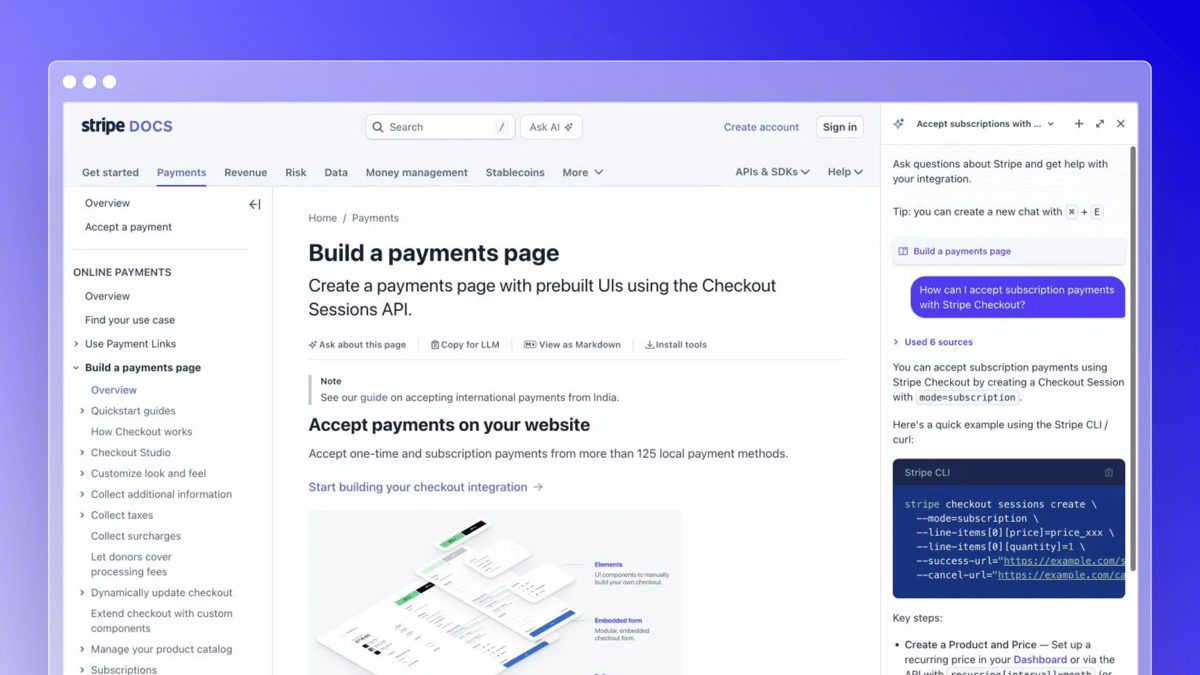
Stripe Docs is where developers read about payments, and the AI assistant sits right on the page. You highlight a passage you don’t understand and ask about it. Stripe says the assistant draws on its documentation and internal knowledge base.
The reader never leaves the page. You can keep asking follow-up questions about the same concept without opening a separate chat window.
Takeaway: Let readers ask about the exact sentence that confused them. Stripe’s docs show how.
2. Vercel docs Ask AI
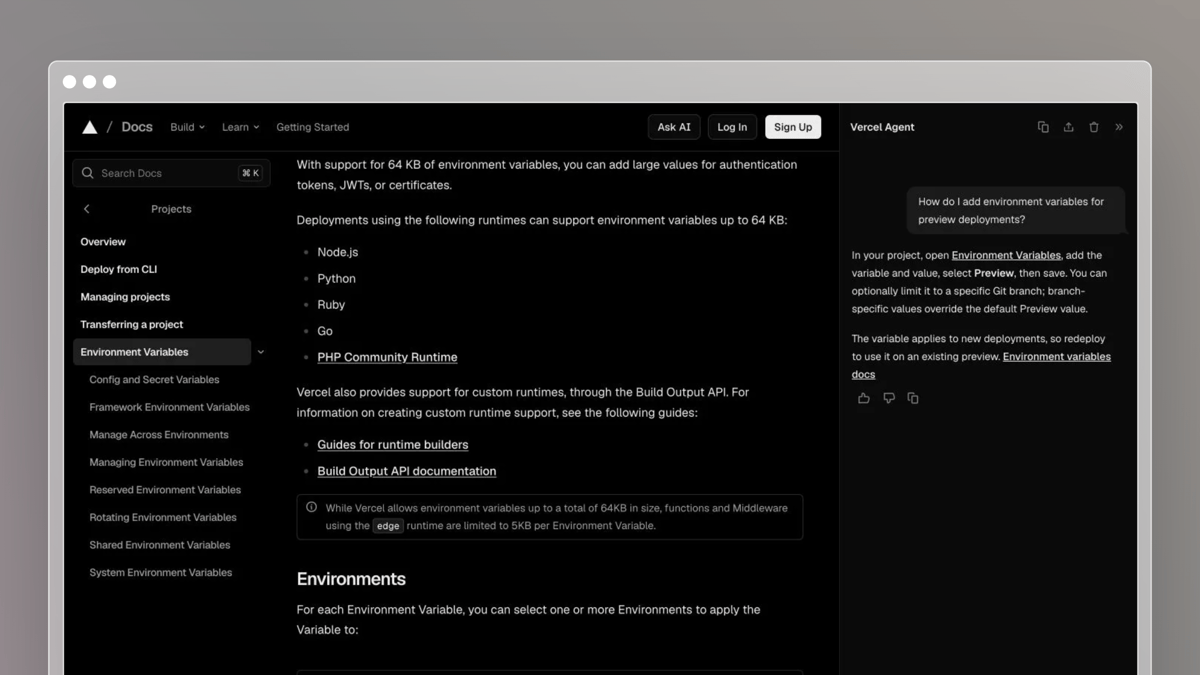
Vercel’s documentation has a conversational Ask AI built in. Visitors type a question and get an answer about the docs from any page.
The smart detail is page context. You can add the page you’re reading, so the answer stays focused on it. You can also copy the whole conversation as Markdown to save or share with a teammate.
Takeaway: Make answers portable. Vercel’s Ask AI lets a developer paste a conversation straight into a ticket or a pull request.
3. OpenAI Developers Docs agent
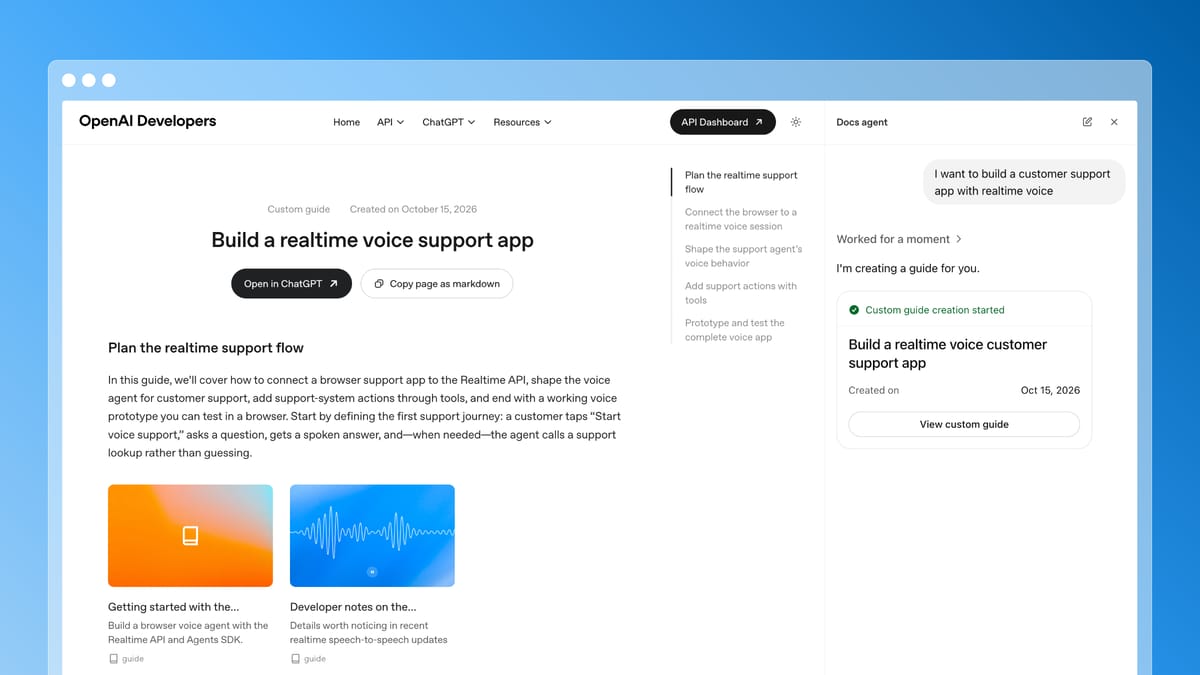
OpenAI Developers includes a Docs agent. In the example I looked at, a user asks it to help build a customer support app with realtime voice. The agent does not just answer. It creates a custom guide titled “Build a realtime voice support app.”
The guide has sections that plan the flow, connect the browser to a realtime voice session, shape agent behavior, add support actions with tools, and prototype and test the app. I haven’t tested the guide, so I can’t speak to its technical accuracy.
The differentiator is the output. The AI assembles use-case-specific documentation on demand from a stated task, instead of only answering a question or retrieving an existing page.
Takeaway: Let readers describe what they want to build, then give them a guide shaped to that task. Explore OpenAI Developers.
4. Zendesk support help center
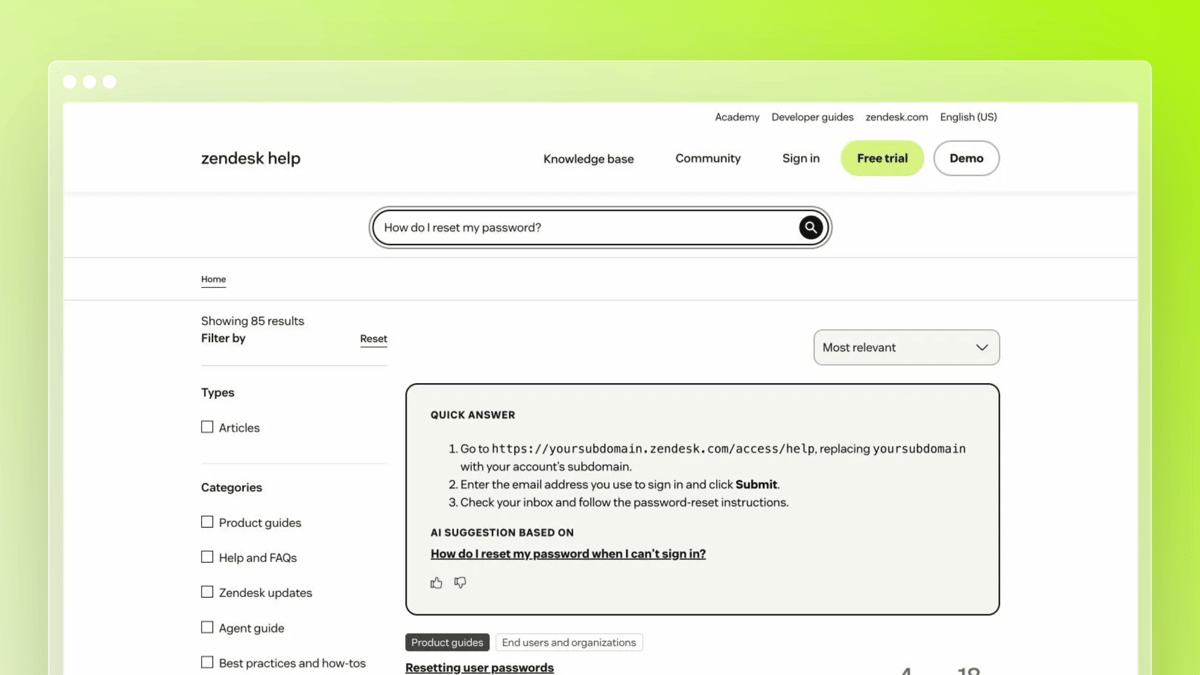
Zendesk’s own help center shows generative search in public. You type a question, and a generated answer appears above the search results. The articles it drew on are listed below.
That layout gives a customer a fast answer and keeps the full article one click away.
Takeaway: Lead with the answer, then show the sources. Zendesk’s AI knowledge base page also names self-service ratio and AI resolution rate as the numbers to track.
5. Document360 documentation site
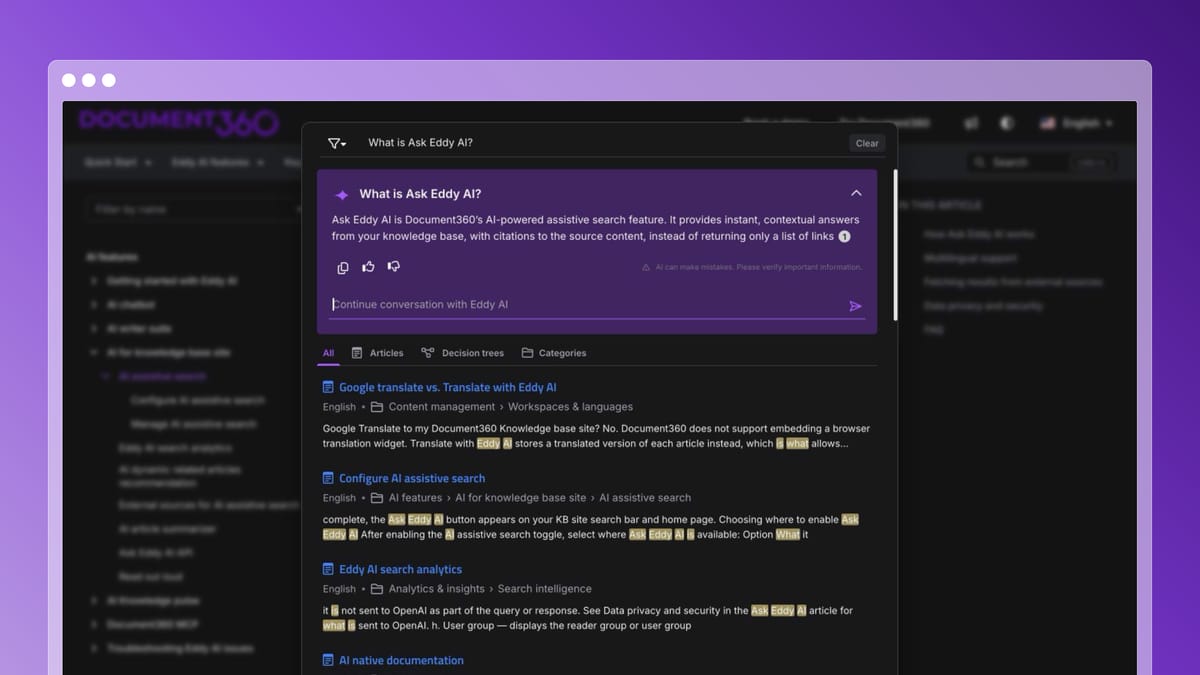
Document360’s own docs are a good place to see its Ask Eddy assistant at work. Eddy turns published articles into a direct answer with citations.
Citations matter when a procedure has too many steps for a summary. The reader gets the short version and clicks into the full article for the rest.
Takeaway: Pair a short generated answer with a link to the full article. Try it on their docs.
6. Intercom help center
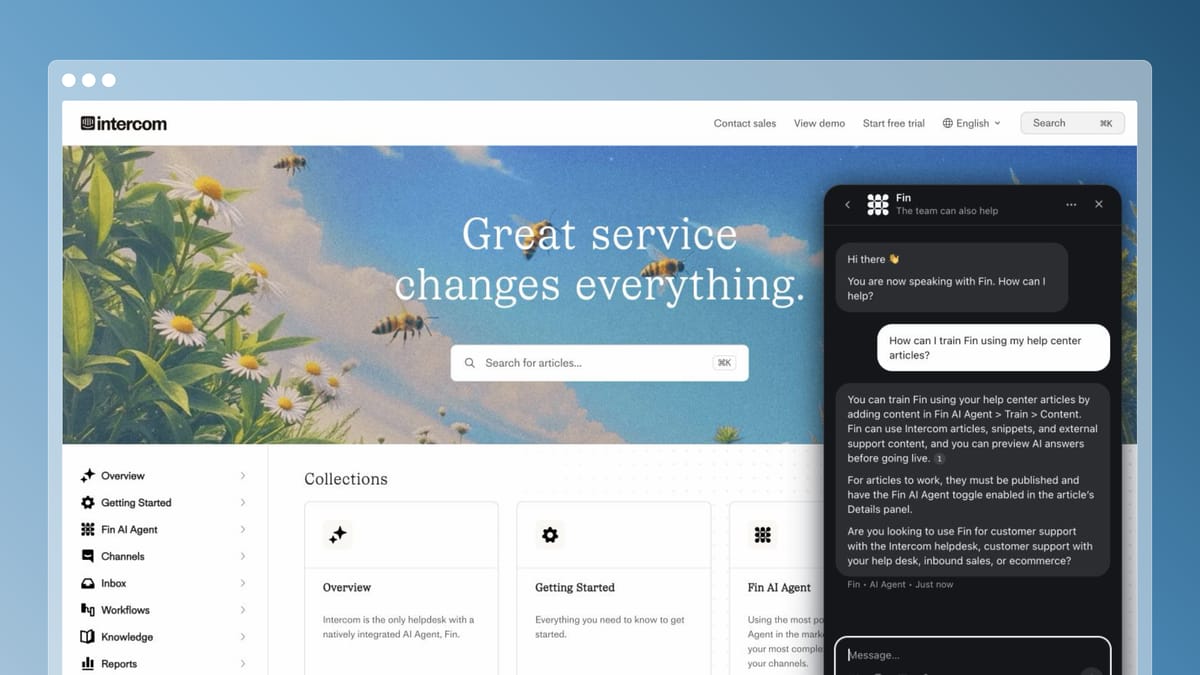
Intercom’s help center is a public library of support articles. The same articles are the knowledge behind Fin, Intercom’s AI agent, so the library does double duty. Customers can browse it directly, or search for articles inside the Messenger.
Intercom also reports on article performance and search gaps. That shows a team which questions customers asked that no article answered.
Takeaway: Treat your help center as the source for every answer channel, and read the gaps report. Start by browsing Intercom’s help center.
7. Ferndesk help center
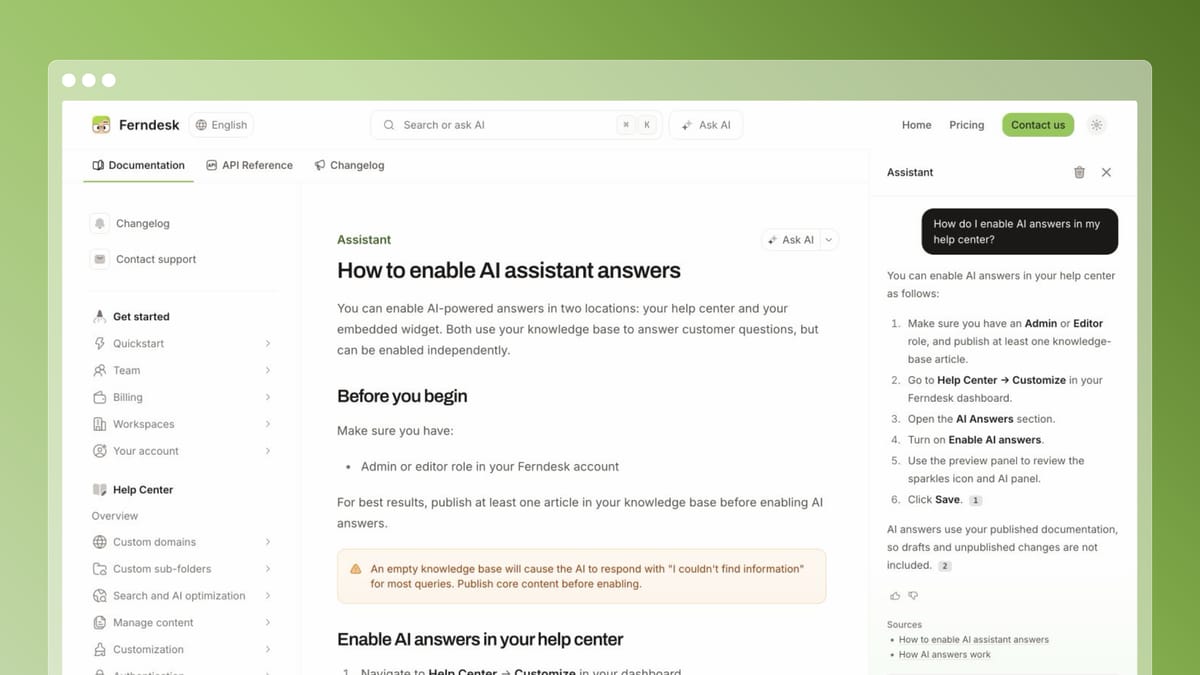
Ferndesk’s own help center is built for a product that ships often. Visitors search or chat in plain language and get answers drawn from published articles.
Behind the scenes, Fern watches GitHub pull requests, Linear, and support tickets, then drafts article updates for a person to approve. Nothing publishes without review.
Takeaway: Plan for how articles get updated when the product changes, not just how they get found. See how it works in the help center.
8. Supabase docs
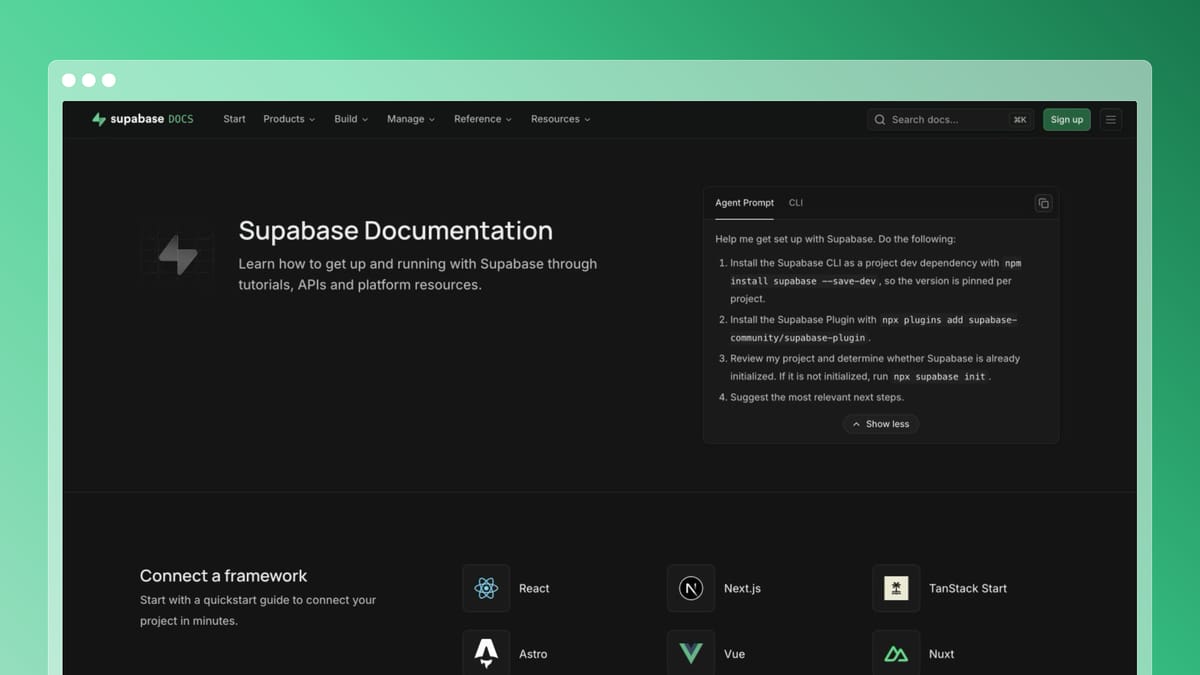
Supabase’s documentation puts an Agent Prompt on its homepage. Developers can copy instructions that ask their coding assistant to install Supabase tooling, check whether the project is initialized, and suggest the next steps.
The useful detail is where the instructions go. Instead of keeping the reader inside a docs chat, the prompt carries setup guidance into the AI tool where they are already working. Supabase also publishes an AI tools guide covering plugins, MCP, and skills for coding assistants.
Takeaway: Give developers a useful starting prompt they can take into their coding assistant. See the Agent Prompt in Supabase’s docs.
9. Anthropic docs
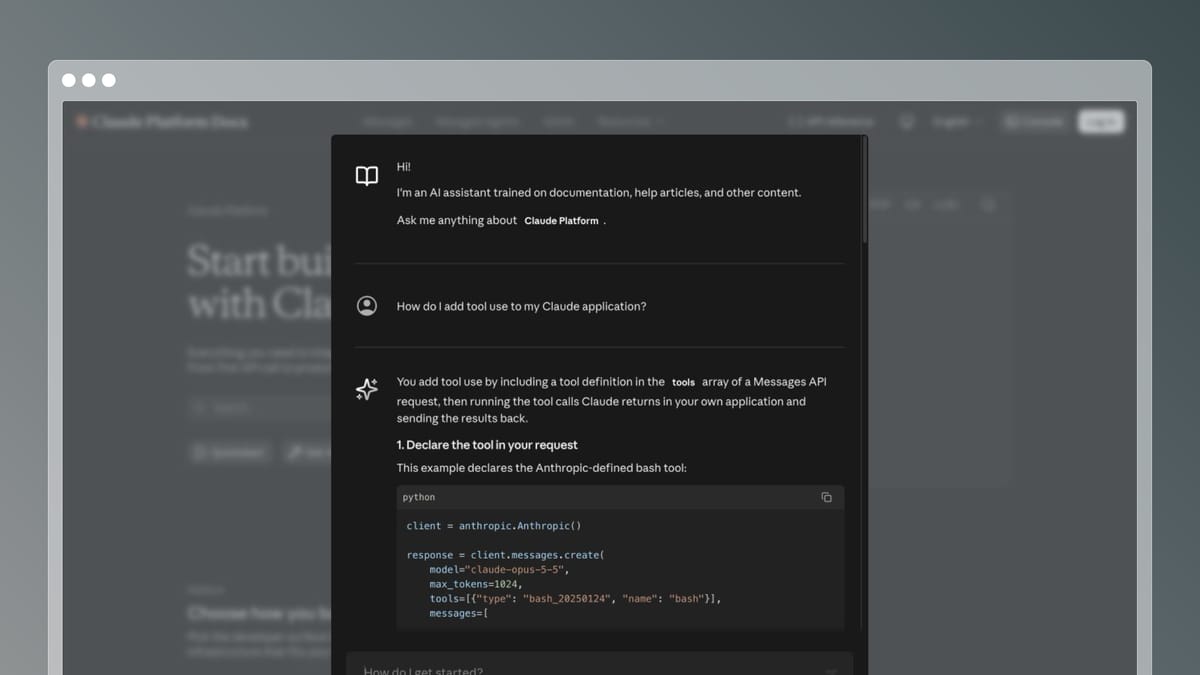
Anthropic’s documentation covers the Claude API and models, and it includes an AI assistant for asking questions about them. You describe what you are trying to build and get a pointer into the relevant pages.
The example is memorable because the subject changes fast. Models, parameters, and features get updated often, so a stale page turns into a confidently wrong answer quickly.
Takeaway: The faster your product changes, the more your assistant depends on current pages. Open the Anthropic docs and ask about a feature you know changed recently.
What these AI knowledge base examples have in common
- Short answer, full source: The best examples give a quick answer and link to the article behind it.
- Answers where the question happens: Stripe and Vercel answer on the doc page itself. Zendesk and Anthropic answer in or beside the search box.
- Documentation for coding assistants: Supabase packages setup guidance as an Agent Prompt readers can copy into their AI tools.
- Answers shaped to the task: OpenAI’s Docs agent builds a custom guide from a stated goal, not just a reply.
- Gap reporting: Intercom shows which questions had no article.
- Ongoing upkeep: Answers are only as current as the articles underneath. Self-updating knowledge base tools exist because that work never finishes.
AI knowledge base FAQ
How is an AI knowledge base different from a traditional one?
A traditional knowledge base relies on keyword search and browsing. An AI knowledge base understands the question and returns a direct answer, usually with links to its sources.
Can AI write or update articles?
Yes, some tools draft updates for human review. Ferndesk drafts changes from merged pull requests and support tickets, and nothing publishes without approval.
Should I pick an internal or customer-facing option?
Pick based on who asks. All nine examples above are customer-facing or developer-facing. For employees, the same ideas apply to an internal knowledge base: cite sources and name owners.
Conclusion
The best AI knowledge base examples share one habit: they make answers easy to find and easy to trace back to an article someone maintains. Open two or three of the examples above, ask them a question you actually get from customers, and borrow what works.
- Answers on the page: Stripe Docs, Vercel docs, Anthropic docs
- Documentation for coding assistants: Supabase docs
- Guides built on demand: OpenAI Developers Docs agent
- Answer above the search results: Zendesk support help center, Document360 docs
- Help center that feeds every channel: Intercom help center, Ferndesk help center
For more options, see my roundup of best AI knowledge base software.



 Book a demo