
MCP support and public API rework
Customers are already asking ChatGPT how your product works. We'd rather they hear it from you. This month, we're making it easier for your help center can show up in the AI tools people already use, and connect to the rest of your stack. Here's what's new in Ferndesk!
🤖 MCP Support: Claude, ChatGPT, Cursor and more can search and read your docs and create article changes as drafts
🔌 Public API rework: Manage articles, drafts, publishing, revisions, translations, analytics, feedback, and conversations in HTML, Markdown, and JSON
📡 Webhook support: Subscribe to signed notifications for article updates, customer feedback, and other help center activity
🌿 Choose GitHub production branches: Let Fern review merged changes against the branch that actually ships for each repository
🚚 Migrate from Slite and Docusaurus: Preserves navigation, ordering, internal links, redirects, rich content and videos
MCP Support
Claude, ChatGPT, Cursor, Codex, and any other MCP client can connect to your help center in two ways: your team can connect AI tools to manage your workspace, and your users can connect AI tools to search your published docs. The second one is a toggle you turn on.
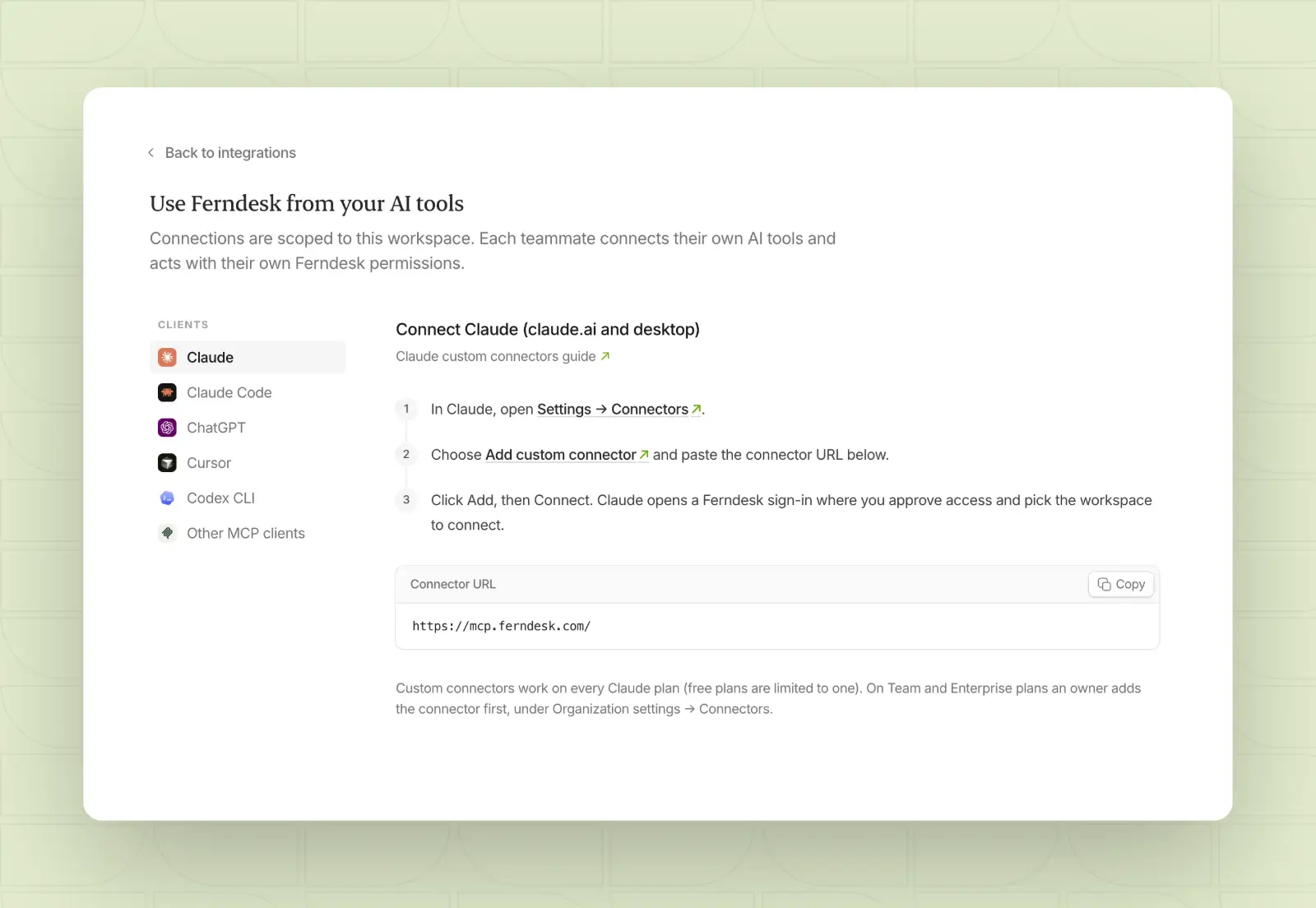
Manage your workspace with AI tools
From AI clients in Integrations, your team can connect tools like Claude, ChatGPT, Cursor, and Codex to your workspace. Connected tools can search and read your articles, review analytics and conversations, and make changes that arrive as drafts for you to approve. There is no separate switch for this; each teammate signs in and connects their own tools, and changes follow their own Ferndesk permissions.
Let your users search your docs with AI tools
You can also let your users connect your published help center to their AI tools, so they can search your docs and get sourced answers from Claude, ChatGPT, Cursor, and other MCP clients.
Sign-in depends on your access settings. Locked help centers always ask users to sign in with the same methods as your web help center.
Open help centers let AI tools read public content without a sign-in, and you can require sign-in from the same MCP section when you want AI tools to act as a signed-in user or reach gated collections. See let readers use your help center in AI tools to learn more.
Public API rework
The public API now covers the full article workflow, from writing to publishing to measuring results, with content in HTML, Markdown, or JSON.
Articles and drafts: Create and edit articles and drafts programmatically
Publishing: Publish and unpublish content, and manage revisions
Translations: Read and manage translated versions of your articles
Analytics and feedback: Pull help center analytics and customer feedback
Conversations: Work with customer conversation data
Browse every endpoint in the API Reference, or create API keys from your dashboard.
Webhook support
Webhooks tell your other tools when something changes in your help center, like when an article is updated or a customer sends feedback. Notifications are signed so you can verify they came from Ferndesk, and delivery is retried automatically if it fails.
Choose GitHub production branches
You can now pick which branch counts as production for each GitHub repository. Fern uses that branch when it reviews merged changes to decide what needs documenting. If the branch is deleted, Ferndesk falls back to the repository's default branch. Choose production branches from your GitHub integration settings.
Migrate from Slite and Docusaurus
You can now import from Slite and Docusaurus. Slite imports keep your navigation, article and collection order, internal links, redirects, rich text, sketches, and videos. Docusaurus imports bring over your site structure, articles, collections, sections, redirects, and images, including multi-product sites with versioned documentation.
See Migrate your help center to Ferndesk for the full list of supported sources.
Other improvements
Faster, more accurate search: Help center search now combines article and API reference results, understands natural-language questions and misspellings, and returns fewer unrelated results.
Widget answers stay in the customer's language: The widget assistant answers in the language of the latest message, even when the best matching article is in another language. Labels and steps are translated too.
More ways to hide image details: The image editor adds pixelation, soft blur, secure blur, and blackout effects, and redaction stays in place when you save or export an image. Cropping has a live preview with clearer cancel and revert.
Control article update dates: Articles can show a localized Updated date. The date is hidden by default, and you can turn it on from help center customization.
More reliable Fern drafts: Fern now researches your sources more thoroughly, which means more detailed and accurate drafts. Failed runs show a clear error so you know what happened.
Improved Fern task review: Tasks open with a clearer summary, a simple switch between changes and the editor, and arrows to move between changes. Your place in a task is kept after a refresh.
Smarter task notifications: Completion notifications now follow where you last worked on a task. Tasks started from Chrome, Linear, or Slack skip the unread badge, and Linear and Slack tasks skip the completion email unless you follow up.
More reliable imports: Imports handle provider addresses and document links more reliably, and imported help centers no longer load content from the previous provider's URL.
Breaking changes
Article subtitles removed from API and AI tool responses: Public API and AI tool responses no longer include article subtitles. Subtitles already on your articles stay in place, but anything that reads article data through the API or an AI tool needs to be updated.