
API references, GraphQL support, and a refreshed playground
API references used to be REST-only, and browsing one meant paging through a plain list of endpoints. Now Ferndesk publishes full API references for REST and GraphQL, with real sidebar layouts and a playground you can actually test from.
📘 GraphQL support: Publish GraphQL APIs from an SDL file, an introspection JSON export, or a live endpoint
🗂️ New API sidebar layouts: Flat, Folders, and Collapsed, with custom group order and icons
🚀 A refreshed playground: Send real requests with Try it for REST and a full GraphQL playground
🔄 Sources that stay in sync: Upload a spec, pull from GitHub on every push, or point at a URL that refreshes itself
GraphQL support
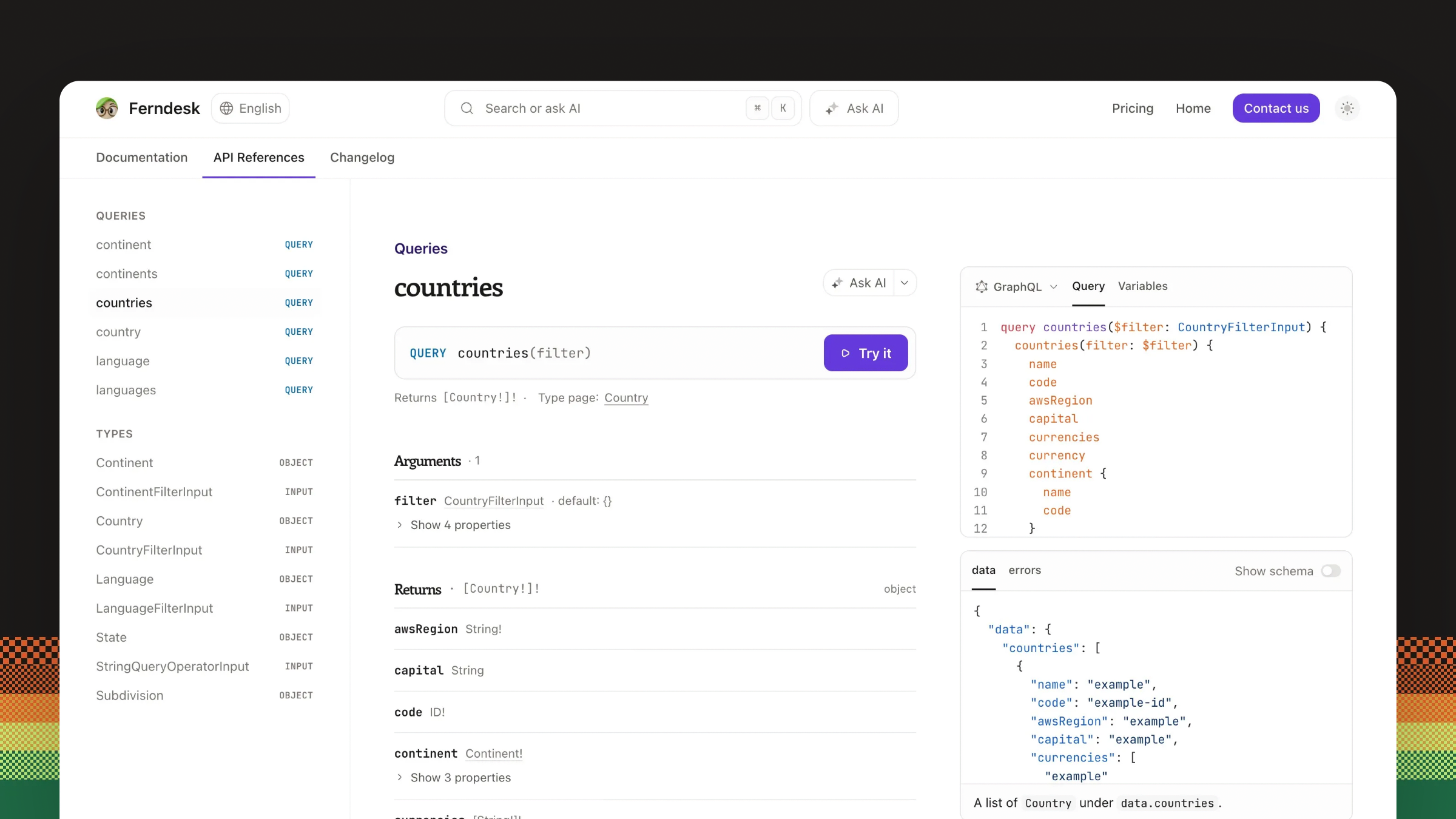
GraphQL APIs are now first-class. Point Ferndesk at a GraphQL SDL file, an introspection JSON export, or a live endpoint with introspection enabled, and you get generated type pages alongside your operations.
You decide how much of the schema readers see. A Show types setting adds a Types section to the sidebar, and you can hide individual types the same way you hide REST operations and schemas.
Readers explore your schema in the GraphQL playground, which is restricted to the endpoint you configure for the reference. See Customize an API reference.
New API reference sidebar layouts
Choose how your reference navigates: Flat for a single list, Folders for grouped endpoints, or Collapsed to keep long references tidy. Rearrange groups, add icons, and show or hide individual operations, schemas, and types.
Edits survive reprocessing. Replace or refresh the source and your summaries, Markdown notes, custom code samples, and layout choices stay put.
A refreshed playground
The Try it button opens Ferndesk's built-in playground right on the operation page. Edit parameters, headers, cookies, and the request body, pick a server, and send. Responses render next to the request, and your request history stays available while you explore. See Use the API reference playground.
Sources that stay in sync
Upload an OpenAPI, Swagger, or GraphQL spec file, pull the spec from a GitHub repository, or point at a URL.
GitHub sources re-sync automatically when a push changes the spec file, defaulting to your repository's production branch. URL sources refresh every six hours on their own, and you can refresh either one manually whenever you like. Setting up a source is covered in Create an API reference, and keeping one healthy in Fix API reference source errors.
Creating, replacing, and publishing API references require an active or trialing subscription.